Found the content on this page useful? Share it with your team!
What is an AI agent and how do AI agents work? A field guide for AEC professionals

.png)
Table of Contents
.png)
I watched a proposal coordinator walk us through her Tuesday recently. It went like this:
A 180-page RFP landed in her inbox at 8:30 AM. By Friday, she needs to build a compliance matrix, select matching project experience, track down updated executive resumes, and get the proposal into layout—all while chasing down principals-in-charge for missing project details.
AI can already help with parts of that workload. The harder question is: what can you safely hand over to software versus what requires manual effort?
The word "Agent" is plastered across vendor slide decks in the architecture, engineering, and construction (AEC) industry. Yet most of what gets sold as an agent is simply a chatbot with better manners (a.k.a prompt engineering). Separating software hype from true capability—and knowing which pursuit tasks justify an agent—is quickly becoming an essential skill for marketing and business development leaders.
This piece gives proposal and pursuit teams a practical framework to evaluate the technology: what an AI agent actually is, how agents differ from chatbots and assistants in a pursuit workflow, what foundations agents require in AEC, and what to look for during vendor demos.
What is an AI agent in AEC and how do AI agents work?
An AI agent is software designed to achieve a defined goal by autonomously planning steps, using connected internal systems to gather data or take actions, and stopping when the job is complete.
Unlike a standard generative text window, a working AI agent requires four core components:
- A Clear Goal: A specified deliverable or outcome (e.g., "Build a draft compliance matrix for Section C of this RFP").
- Tool-Calling Capabilities: The ability to autonomously query internal databases—such as Deltek Vision/Vantagepoint, OpenAsset, SharePoint archives, or CRM records—without a human manually copy-pasting text.
- Working Context: Access to active pursuit data, client history, and previous submittals.
- A Stopping Condition: A defined rule or verification check that tells the agent when the task is finished.
In Short: A chatbot answers a single prompt. An assistant helps polish the paragraph you are typing. An AI agent takes an entire pursuit task, plans the necessary steps, executes queries across your systems, and hands back a structured deliverable.
AI Agent vs Chatbot vs. Assistant: What’s the Difference in a Pursuit Workflow?
To understand where different AI tools fit into AEC marketing workflows, it helps to ask one question: Who decides what happens next?
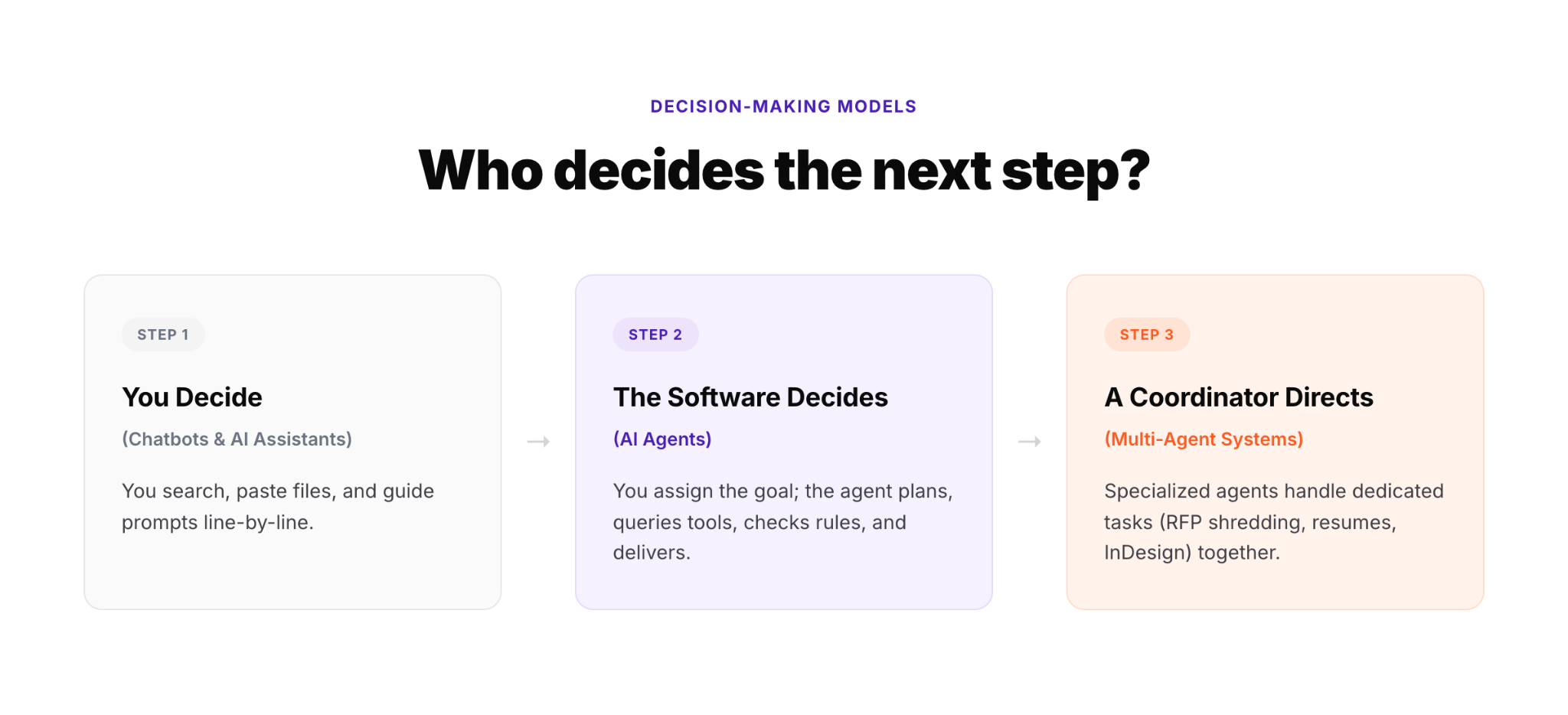
- Chatbots & Assistants (You Decide): You locate the file, paste the context into a prompt box, and direct the output. Example: You point Microsoft 365 Copilot to last year's proposal and ask it to summarize the technical approach. It saves typing time, but you managed the workflow and supplied the source data.
- AI Agents (The Software Decides): You assign the high-level objective. Example: You prompt the tool: "Shred this RFP into a compliance matrix, flag page-budget constraints, and cross-reference our past project library." The agent creates a plan, queries project databases, identifies missing requirements, and returns a structured matrix with 34 compliance points and 9 potential content gaps.
- Multi-Agent Systems (A Coordinator Directs): Specialized agents collaborate across an end-to-end workflow under human supervision. An RFP Agent builds the compliance matrix, a Project Agent pulls relevant experience from Deltek, a Resume Agent isolates staff records, and a Layout Agent stages approved text into Adobe InDesign frames.
4 Signs You’re Looking at a True AEC AI Agent
When evaluating software or testing vendor claims, look for these four operational characteristics:
1. Assigned Outcomes Over Turn-by-Turn Prompts
You do not direct a true agent line-by-line. Instead of prompting "Write a paragraph about our QA/QC process," you assign a goal with a definition of done: "Build a compliance matrix for this 80-page RFP and flag unassigned technical sections."
2. Autonomous System Execution
Generative chat windows sit passively and wait for uploaded PDFs. An agent identifies when required metrics are missing, autonomously queries central project databases or CRMs, retrieves verified record sets, and routes formatted content straight toward layout environments like Adobe InDesign.
3. Verification Checks Between Execution Steps
Before drafting text, an agent pulls a contract value, verifies it against the primary database record, and flags discrepancies automatically. Skipping this self-verification step is the digital equivalent of ordering structural steel before field-verifying site dimensions.
4. Active Record Enrichment
Generic AI tools treat every query as a blank slate. An AEC agent recognizes specific project identities (e.g., your firm's Fort Worth water facility), pulls verified metrics, highlights missing metadata, and stages records to leave your central database cleaner for the next pursuit.
The key difference between a basic chat interface and an agentic workflow is the internal evaluation loop. An agent continually tests its progress against a stopping condition before delivering the final result.
💡Trying to figure out which specific pursuit tasks in your firm actually justify an agent vs. a simple prompt? Read our decision guide on Generative AI vs. Agentic AI.
Three behaviors to watch for in a demo
When vendors pitch "agentic" capabilities, skip the polished slides and test for these three operational realities:
- Does it fetch what it's missing without being told? Ask the vendor to run their tool on an incomplete project record or RFP. A basic chat tool will stall or hallucinate missing facts. A true agent detects missing fields (e.g., missing delivery methods or unverified fee figures), queries connected CRM or ERP systems, and flags the gap.
- Does it check itself between steps? Watch how the tool handles key project metrics. Does it cross-reference draft text against source system records before finalizing the section?
- Does it leave your records better than it found them? Does the tool output raw plain text in a chat bubble or chat-interface, or does it export structured content ready for submittal grids, client matrices, and Adobe InDesign templates?
What Makes an Agent Work in AEC Specifically
You cannot deploy a generic off-the-shelf AI agent on Friday and expect it to generate compliant proposal submittals on Monday. Generic tools stall in AEC because our industry does not run on standard business text—it runs on highly structured, interconnected project data.
For an AI agent to function effectively in an AEC proposal environment, it requires four specific foundations:
- Pursuit History: Awareness of what your firm built, what proposals won or lost, and how selection committees scored specific technical approaches.
- AEC BD Taxonomy: Understanding structural nuances—knowing that "Water" is not a single category, but must distinguish wastewater treatment plants, conveyance pipelines, and storm pumping stations with tailored scope terminology for each.
- Unified Project Data Models: Connecting staff resumes, project profile sheets, fee schedules, and client debriefs into an interconnected database rather than isolated PDF folders.
- InDesign as a Destination: Plain text in a chat bubble is not a finished proposal. A functional AEC agent bridges data directly into layout environments where marketing teams assemble final submittals.
Comparing the AEC AI Software Landscape
Not all tools claiming "agent" status operate at the same level. Here is how the current software landscape breaks down for proposal teams:
If your IT leadership suggests building these tools internally on top of general enterprise software, read our honest assessment on what it actually takes to build custom pursuit agents on Copilot.
The maintenance column is what most firms leave out of the business case. A DIY agent becomes a project with no owner the day its builder changes roles, and when Microsoft updates the base model underneath it, systems break with no error message and nobody assigned to notice.
Where AEC AI Adoption Stands Today: The CRM & Data Bottleneck
Despite the vendor noise, pure agentic workflows are just beginning to enter proposal workflows. Recent industry data shows that 67% of AEC firms currently have less than half of their proposal process AI-powered, with most relying on basic chat interfaces for quick rewrites.
The bottleneck is trust and data structure. Only 29% of AEC firms report high confidence in the records feeding their current AI tools. Most organizations sit on years of inconsistent project sheets, unstandardized resumes, and scattered drive folders.
Agents are the next conversation rather than the current one for exactly that reason. An agent multiplies whatever your institutional knowledge already is. If your project data lives in four spreadsheets with three different values for the same contract, an agent will produce wrong answers faster than a person could.
The firms successfully deploying agents today started by structuring their project data first.
Recommended Next Steps for Pursuit Leaders
Before demo-ing new tools, start with an honest audit of your own records. Reconcile conflicting fee figures across systems, fill in missing project delivery methods, and update stale resumes. Doing this groundwork today means evaluating software on its actual merits tomorrow. Skipping it guarantees a failed pilot, bad outputs, and wasted budget.
If you want help with structuring your data without the manual work that goes into it, we’ve got something cooking. Book a chat with us and we’ll make it worth your while (promise!)
Next: if you already know what an agent is and want to work out which parts of your process warrant one, check out this complete breakdown of all 24 tasks an agent can execute across the pursuit lifecycle.
FAQs
What is the difference between an AI agent and a chatbot?
A chatbot responds to direct user prompts using context pasted into the conversation. An AI agent is given a broader goal, calls external software tools, maintains working context, and executes steps independently until a stopping condition is met. A chatbot answers questions; an agent completes tasks.
What is the difference between an AI assistant and an AI agent?
An AI assistant operates turn-by-turn inside tools you already use, relying on human direction at every step. An AI agent takes an assigned objective and plans execution steps independently. Practical test: if you already knew the answer and wanted help drafting text faster, you used an assistant. If you assigned a multi-step workflow across systems, you used an agent.
Are AI agents currently being used in construction and engineering?
Yes, primarily in targeted, high-repetition workflows: RFP requirement shredding, spec sheet review, submittal triage, schedule risk checks, and proposal content staging. However, broad adoption remains early—67% of AEC firms still operate less than half their proposal workflows on AI, with data quality remaining the leading implementation challenge.
Is ChatGPT an AI agent?
No, not by default. ChatGPT is a conversational AI. It answers questions and generates content when prompted. An AI agent goes further: it can plan multi-step tasks, use tools, and act with some autonomy (e.g., pulling data, updating a file, triggering a workflow) without you walking it through every step. ChatGPT can become agent-like with plugins/tools/custom GPTs, but the base product is a chatbot, not an agent.
What are the 7 types of AI agents?
Common framework:
- Simple reflex agents – react to current input only, no memory (basic rule-based bots)
- Model-based reflex agents – keep an internal sense of "state" to handle incomplete info
- Goal-based agents – act to reach a defined goal, weighing different paths
- Utility-based agents – choose the best path among options, not just a path
- Learning agents – improve performance over time from feedback
- Hierarchical agents – break big tasks into sub-tasks handled by subordinate agents
- Multi-agent systems – multiple agents collaborating, each with a role
Think of it like project delivery methods. Reflex agents are like following a rigid spec sheet, while multi-agent systems are closer to a fully coordinated design-build team where each party has a lane.
How do AI agents work in a proposal workflow?
An agent can chain steps that used to require manual handoffs:
- Pull past project data/resumes from your CRM or shared drive
- Match qualifications to RFP requirements
- Draft relevant sections (past performance, org chart narrative, etc.)
- Flag missing info or inconsistencies
- Route sections for SME/PM review
- Assemble and format the final draft
It's less like a single tool and more like an automated proposal coordinator. It doesn't replace your capture manager, but it handles the repetitive assembly work so your team focuses on strategy and win themes.